
Main
Download
Inst/Conf
What?
How?
Why?
Order?
Truth!
Future!

tlhIngan quja' - klingon keyboard layout for ASK

A note for those who don't know ASK (AnySoftKeyboard):
ASK is an application for the android OS. ASK allows you to replace the default (soft, i.e. picture on your touchscreen) keyboard with a customized layout.
For example if your device has the standard QWERTY keyboard but you're used to typing on a DVORAK keyboard, you can simply download and install the respective layout.

Quite likely klingons will have a keyboard layout of their own. So far however, it seems everyone who ever used klingon keyboards neglected to report about their layout. That's why we're stuck with trying to use QWERTY keyboards for tlhIngan Hol, having to use the shift key, abusing some keys but leaving others literally untouched.
It's worse on a handheld device where the letters are too small already and you have spend precious time and space for keys you don't need or only need as stepping stone (who needs an 'd', I ask you? All I need it for when I write in the glorious warriors tongue is to get the 'D').

For these reasons I decided to create my own keyboard layout - tlhIngan quja'.
It contains only the letters you really need, ordered in a way that should improve efficiency.
Also, thanks to the capabilities of ASK, I've included a dictionary with klingon words, so you don't have to type the whole word (you'll still have to know it, though).
Moreover, since I tend to forget which prefix or suffix means what exactly, I added a list of them, which can be enabled optionally (it replaces the smileys - but why would a klingon text need a smiley, right? :-).

BTW, since you're obviously interested in klingon, you should also install boQwI', the klingon language assistant. It's a helpful program that'll aid you in translating words.

Download

I'm currently working on a new version, either standalone or integrated into the AnySoftKeyboard layout library (pending review). Sorry fo the inconvenience.

Installing and configuring

Installing is easy - if you go through the google play site, it'll install itself. Otherwise all you should need to do is open the file in some file explorer.

Important: Since it is merely a custom layout for the host program, ASK, you need to install that first! You can install it without ASK being installed, I suppose, but it won't do anything.
Once installed, it will be available as layout in ASK. Just select it, and off you go.
The dictionary should activate itself automatically - if not, try to force it and reset it, that seemed to help when it didn't want to work on the virtual android device I used to test.
The prefix list can be found under "quick text keys" in the ASK menu. Remember that it will replace the smileys - unfortunately for all layouts, not just quja'.
Also, the heading of the popup will still be "insert emoticon" - I'll try to change that to something useful, but so far I didn't have success. I decided to publish it anyway, as this is just a minor issue.

What it does and what it doesn't do

As noted above, it is a mere keyboard layout. Sadly it doesn't magically create klingon symbols instead of latin letters, nor will it translate your text. I wish it could...
However, it should make typing klingon text easier - you don't have to use shift to get the upper case letters, nor do you have to type three letters for one character anymore. If you need to type the occassional english word, the QWERTY layout is just a quick tap away (i.e. tapping on the ->ABC-> key will switch to the next layout).

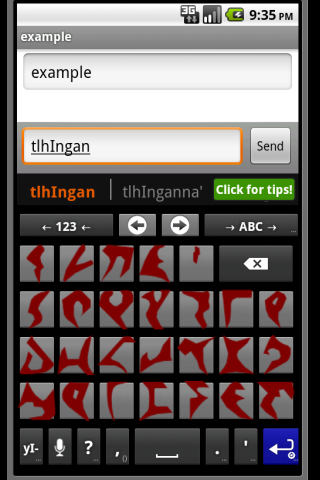
Right now, there are three layouts in the package. One is the simple roman lettered one everyone should use. The first other is using pIqaD symbols - it still doesn't produce them, so the only reason for it is to look cool.
A third layout, again using pictures, uses roman letters again - but this time they're not just characters, but fixed pictures - this is for those of you whose device uses a sans-serif font - i.e. one where you can't tell 'l' and 'I' apart.
The "roman quja'" layout uses the "Mate" font, created by Eduardo Tunni, which is free to use. Google for it, or download it right here.

How to actually write using this layout

That's up to you. I found that it's rather easy to type one-handed - there is a certain symmetry in the design, three columns, one column, three columns.
If you keep your hand at the top row, you should be able to reach all keys easily.

Why this order of letters and not another

A question some might ask is "Why not just keep QWERTY as close as possible?".
Valid question. Counter-question: Where would be the fun in that? :-D
jIqIDneH...
More seriously, the main reason is that I wanted to create a layout that feels more natural, especially on a handheld device with limited space.
I'm sure most have heard the story about how the QWERTY keyboard artificially limits your typing speed but ensures even distribution of finger use, etc... - maybe these stories are true, maybe they aren't.
Doesn't matter - fact is, QWERTY was designed for the english language, for a mechanical device ages ago. Klingon, or more specifically, tlhIngan Hol was designed to feel alien, to be non-human. What good would a human-centric (and not even globally so) layout do here?

So I started from scratch. First thing I did, was trying to find a way to figure out which letters are the most important. So I counted letters. Boring work, I tell you.
As basis for my counting I used two different sources - one is a simple word list of all the klingon words known - more specifically the wordlist from Klingonska Akademien.
For my second source, I turned to literature. What better to examine the use of words than a work of art? I used Hamlet - the restored klingon version.

Surprisingly, while the details varied, the overall distribution is quite similar:
Words split, letters counted - words were NOT unique

01 ’    12109
02 a    12093
03 e    06857
04 o    06695
05 I    06585
06 H    06426
07 j    05617
08 u    05399
09 m    04337
10 D    03882
11 v    03824
12 l    03235
13 gh   03231
14 q    03224
15 S    02958
16 b    02935
17 t    02618
18 ch   02575
19 n    02500
20 p    02351
21 w    02313
22 y    02038
23 Q    01780
24 r    01498
25 tlh  01414
26 ng   00867
(Words split in letters, letters counted)

01 a   996
02 '   862
03 o   793
04 I   636
05 e   608
06 u   574
07 H   464
08 n   403
09 gh  393
10 m   386
11 q   370
12 l   350
13 D   339
14 r   338
15 S   330
16 p   326
17 j   318
18 b   312
19 t   310
20 ch  300
21 v   287
22 y   269
23 Q   260
24 w   241
25 ng  184
26 tlh 171


Please note: what I did was merely a crude count, it wasn't scientific and it's likely my "calculations" are off by a few numbers. The raw material wasn't made for this task, so I had to remove all non-klingon "taint" by hand - maybe I forgot something, maybe I cut too much. I don't think a more exact count will change the numbers much, though.

In any case, the point is moot as this was only my basis for designing the layout.

Order?

Once I had the numbers, I had to decide where to put each letter. Simply putting the most used at the top seems rather silly. At first I tried to use a layout that might be easier to type with a single hand - most used in the middle, less used at the outside.
However, after a while I realized this wouldn't really be useful - it was lacking order, structure.

The truth about the layout structure


So instead I decided to create a few fixtures, introducing an element of stability, so to speak.
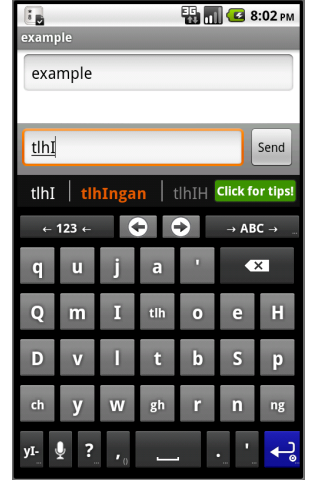
As you can see from the screenshot and the numbers here, the letter "tlh" is actually the least used - yet it features rather prominently on the keyboard.
This is because I thought it is a rather important key - the word tlhIngan starts with it after all - so it should get a prominent place.
Of course, since "tlh" contains "t" and this is another letter, it was natural to place it nearby - directly below.

Let's continue with the double-letters (i.e. "ch", "gh", and "ng"). Obviously they're important too, if only because we're not used to them.
As luck would have it, there are exactly three of them - offering the possibility of a nice symmetry. One on each side, and on in the middle.

As with the "tlh" and the "t", the "ng" contains an "n", so it was put next to it as well.
Lastly, the "q" and "Q". While the former is used rather often, the latter isn't. However, they're again closely related in english, so it would rude to separate them too far :-)

(Also, I wanted to make sure that the first line could be read in klingon - quja' may be a nonsense-word, but it runs of the tongue as if it were a real word.

The future of the quja' layout

Currently, I'm working on a quja' layout for Windows. Right now, only for the actual keyboard, no soft keyboard for Windows (8) phone - yet.
I intend to keep the basic structure the same - for a while I considered redistributing the keys to allow two-handed typing, but I think it would be rather more confusing if you had to remember three different layouts (QWERTY, quja' for touchscreen, and quja' for physical keyboards).
However, the keys are aligned slightly differently, since the QWERTY keyboard isn't a simple grid.
The basic structure, however is the same.
Since quja' uses four lines instead of three, the letters now start at the top row - that is the number row.
I decided to put it on the right side of the keyboard, near the backspace (though not immediately so), to emulate the layout on Android.
Since the left side was completely free, I replicated the numeric block there - I suppose it might be useful on notebooks, which rarely have a separate numeric block.
There are still a few unused keys, which might find use as quick-key for pre- or suffixes. Or symbols perhaps?
If you press SHIFT, or CAPS lock, you get back a simulated QWERTY layout.
If you want to try an early version, feel free to download the installer.
Keep in mind, though that this is an early version, basically untested, created using a program I don't know much about (it's from MS, though, so it should be safe enough).